
Integrating SAP Commerce with Magnolia CMS for an unmatched shopping experience

Introduction
This case study examines the integration of SAP Commerce with Magnolia CMS to build a powerful electronic storefront. The objective is to combine Hybris’s robust e-commerce functionalities with Magnolia’s versatile content management system (CMS) to deliver a seamless shopping experience.
Background
SAP Commerce: A top-tier e-commerce platform that provides extensive tools for managing product content, handling transactions, and offering personalized customer experiences.
Magnolia CMS: A Java-based content management system known for its user-friendly interface, flexibility, and powerful content management capabilities, making it an excellent choice for managing the marketing and content aspects of a website.
Objectives
Flawless Integration: Ensure a seamless merger of SAP Commerce and Magnolia CMS to blend e-commerce capabilities with robust content management.
Enhanced User Experience: Deliver a unified and enhanced user experience by utilizing the unique strengths of both platforms.
Efficient Content Management: Allow marketing teams to manage content independently from the e-commerce functionalities.
Architecture Overview
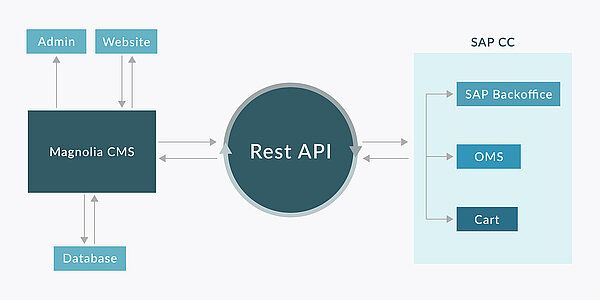
The integration utilizes a hybrid architecture in which SAP Hybris manages the e-commerce backend, while Magnolia CMS oversees the content presentation layer. The two systems are interconnected through APIs, ensuring data consistency and real-time updates.
Steps to Integration
System Setup and Configuration
1. Hybris Setup:
- Install and configure the SAP Hybris Commerce Suite.
- Establish the electronic storefront in Hybris, including product catalog, pricing, and inventory management.
2. Magnolia Setup:
- Install Magnolia CMS.
- Configure Magnolia to manage site templates, components, and content.
API Integration
- Product Data Synchronization: Use Hybris APIs to fetch and sync product data with Magnolia, ensuring that the storefront always displays the most current product information.
- User Authentication and Session Management: Integrate user authentication between Hybris and Magnolia to ensure consistent session management. Use OAuth or similar protocols for secure handling of user sessions.
- Order Management: Orders placed through the Magnolia-managed storefront will be processed by Hybris. Magnolia will transmit order details to Hybris via APIs for processing and fulfillment.
Content Management and Presentation
- Template Design: Develop responsive templates in Magnolia CMS that pull and display product data from Hybris.
- Content Components: Build reusable content components in Magnolia, such as banners and promotional sections, that can be easily managed by marketing teams.
- Dynamic Content Rendering: Enable dynamic content rendering in Magnolia to showcase personalized product recommendations, promotions, and content based on user behavior tracked by Hybris.
Testing and Quality Assurance
- Integration Testing: Conduct thorough integration testing to ensure seamless data flow and functionality between Hybris and Magnolia.
- Performance Testing: Evaluate the system’s performance to ensure it can handle high traffic and large data volumes efficiently.
- User Acceptance Testing (UAT): Engage key stakeholders in UAT to confirm the system aligns with business requirements and delivers a smooth user experience.
Overview
Integration Features
Product Display
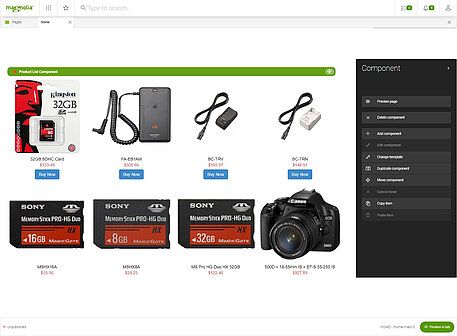
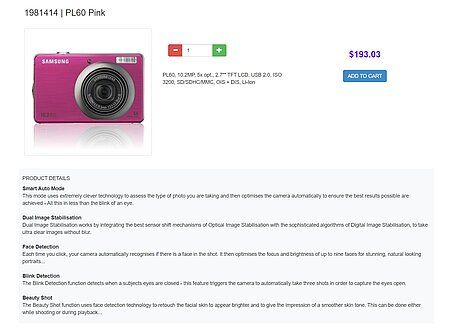
- Magnolia templates are configured to retrieve product details by calling Hybris APIs.
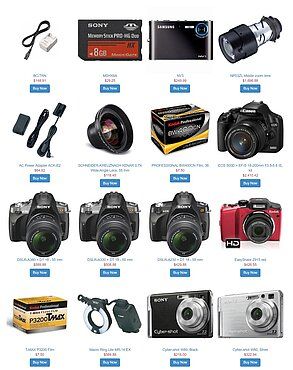
- Product listings and detail pages are dynamically populated with the data received from Hybris.
- Marketing teams can enrich these pages with additional content, such as articles and images, managed directly within Magnolia.


Shopping Cart and Checkout
- Hybris manages the shopping cart functionality, which is seamlessly integrated into Magnolia’s templates.
- Users can add products to their cart, with the data being processed by Hybris.
- The checkout process is handled by Hybris, with Magnolia providing the front-end interface.
Promotions and Personalization
- Marketing teams use Magnolia to create promotional content and campaigns.
- Hybris provides data on user behaviour, enabling Magnolia to display personalized content.
- Perform UAT with key stakeholders to validate that the system meets business requirements and provides a smooth user experience.

Business benefits
Flexibility
Marketing teams can easily update content independently, without needing developer assistance.
Scalability
The system can handle large product catalogs and high user traffic efficiently.
Enhanced User Experience
Users enjoy a seamless experience, combining rich content with powerful e-commerce features.
Conclusion
Integrating SAP Commerce with Magnolia CMS enables businesses to leverage the strengths of a top-tier e-commerce platform alongside a versatile CMS. This combination provides a superior user experience, efficient content management, and a scalable solution for online storefronts. By implementing the outlined steps, businesses can ensure a successful integration that effectively addresses their e-commerce and content management requirements.